
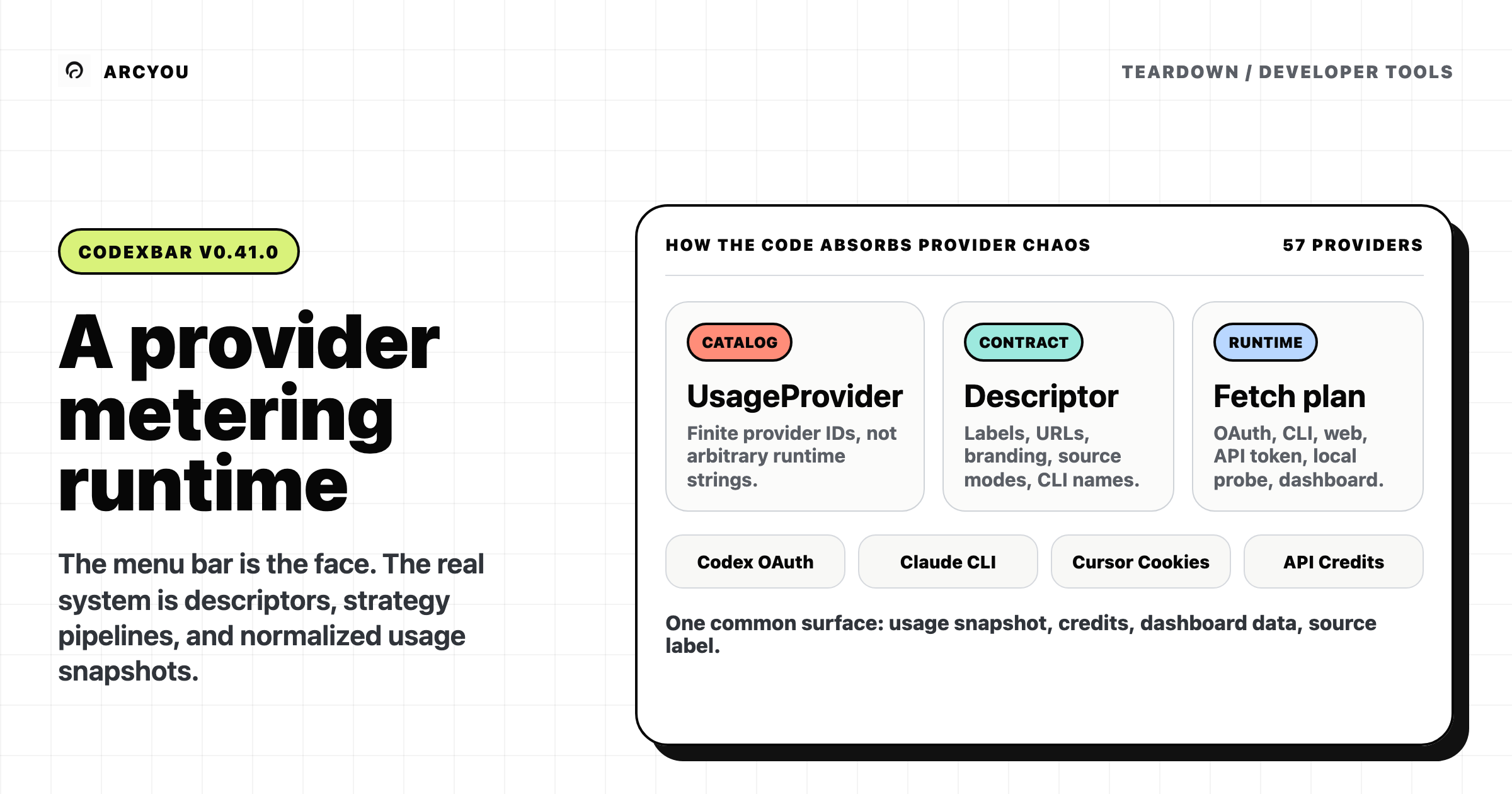
CodexBar looks like a small convenience app: put your AI coding limits in the macOS menu bar so you know when Codex, Claude, Cursor, Gemini, Copilot, and the rest will reset. I read the source at v0.41.0, commit a83a83f, and the more interesting story is not the menu bar. It is the normalization layer underneath it.
The problem CodexBar solves is not “draw a progress bar.” The problem is that every AI coding tool exposes a different kind of limit. One provider has OAuth usage windows. Another needs browser cookies. Another gives an API key balance. Another only has a CLI or a local log. Some reset hourly, some weekly, some monthly, some sell credits, some report incidents, and some say almost nothing useful until you hit a wall.
So CodexBar’s real architecture is a provider metering runtime. The menu bar is the visible surface. The core is a curated catalog of provider identities, descriptors, fetch strategies, and app hooks that turn mismatched vendor signals into a common usage snapshot.
What is it, and where does it sit?
CodexBar is a macOS 14+ menu bar app with a bundled CLI. The README sells the user-facing job well: track session limits, weekly limits, credits, spend, reset countdowns, and provider status for dozens of AI coding providers.
But in code, “dozens of providers” does not mean arbitrary plugins. Provider identity starts as a finite Swift enum: UsageProvider lists the supported cases from codex through clawrouter (Providers.swift:5-63). That is the first important constraint. CodexBar is not a generic marketplace where any provider string can appear at runtime. It is a curated catalog.
The catalog design is deliberate. Each provider case gets a descriptor, and that descriptor owns the provider contract: metadata, branding, token-cost behavior, fetch plan, and CLI metadata (ProviderDescriptor.swift:13-35). The Codex descriptor is a good concrete example: it fills the display labels, dashboard URLs, status URL, icon, token-cost setting, source modes, fetch pipeline, and CLI version detector in one place (CodexProviderDescriptor.swift:7-40).
That puts CodexBar in a useful category: it is not an LLM gateway and not a cost router. It does not sit in the request path between you and a model. It sits beside your tools, reading whatever usage evidence each provider exposes and making the invisible reset windows operational.
The provider descriptor is the center
The cleanest way to read CodexBar is as four layers:
| Layer | What it owns | Source |
|---|---|---|
| Provider identity | The finite catalog of supported providers | UsageProvider |
| Provider descriptor | Labels, URLs, capabilities, branding, fetch plan, CLI names | ProviderDescriptor |
| Fetch strategy pipeline | How to try OAuth, CLI, web, API token, local probe, or dashboard paths | ProviderFetchPipeline |
| App implementation | Settings, login, presentation, menu entries, provider-specific UI hooks | ProviderImplementation |
The descriptor registry makes this explicit. ProviderDescriptorRegistry maps each UsageProvider case to a concrete descriptor singleton (ProviderDescriptor.swift:55-113), then bootstraps by iterating UsageProvider.allCases and failing if a descriptor is missing (ProviderDescriptor.swift:114-121).
That is the maintenance contract. If you add a provider, you do not just drop in a fetcher. You add a provider identity, descriptor, strategy, app implementation, icons, settings, and tests. It is heavier than a dynamic plugin interface, but it buys a stable product surface. The app can know which providers exist, which ones are primary, which ones support credits, which ones have status URLs, which source modes they accept, and which CLI aliases map back to them.
Fetching is a strategy pipeline, not one giant switch
The fetch path is where CodexBar earns its shape. A provider strategy has four required pieces: an id, a kind, an availability check, a fetch function, and a fallback policy (ProviderFetchPlan.swift:188-194). The kinds are broad enough to cover the messy real world: CLI, web, OAuth, API token, local probe, and web dashboard (ProviderFetchPlan.swift:179-186).
The pipeline resolves a list of strategies from the context, checks each one, records an attempt, and either returns the first success or falls through when the strategy says fallback is allowed (ProviderFetchPlan.swift:220-275). That attempt log matters because “why is my Claude meter stale?” is a product question, not just an exception.
The interesting bit is that strategy order can depend on both runtime and source mode. Codex has a simple split: in auto mode, both app and CLI try OAuth first, then CLI; explicit modes narrow to OAuth, web, or CLI (CodexProviderDescriptor.swift:43-75). Claude is more involved: it runs a source planner and maps planned steps into Admin API, OAuth, web, or CLI strategies (ClaudeProviderDescriptor.swift:45-77).
That is the design decision: CodexBar does not pretend every provider has the same kind of truth. It gives each provider a controlled strategy list, then forces the output into the same shape.
The common shape is a usage snapshot
Every successful strategy returns a ProviderFetchResult. That result has a UsageSnapshot, optional credits, optional dashboard data, a source label, and the winning strategy ID/kind (ProviderFetchPlan.swift:97-141). Strategies get a helper to wrap those fields consistently (ProviderFetchPlan.swift:196-210).
That is the compression step. Claude OAuth, Codex CLI, an OpenAI dashboard scrape, a local cost scan, or an API-key balance can all be messy upstream. Downstream, the menu bar and CLI are looking at snapshots, credits, dashboards, status, and source labels.
This is why “menu bar app” is too small a description. The UI is downstream of a normalization boundary.
The app layer is a hook boundary
CodexBar keeps app-side provider implementations separate from core descriptors. The protocol says this plainly: app-side implementations return data and behavior descriptors, while the app owns UI; identity fields stay siloed per provider (ProviderImplementation.swift:4-9).
The hook list is long but bounded: presentation, settings observation, availability, source labels, source mode, runtime, settings toggles, settings fields, menu entries, login action, and login flow (ProviderImplementation.swift:13-83). The app has its own exhaustive implementation registry mapping every UsageProvider to a concrete app implementation (ProviderImplementationRegistry.swift:14-73).
That split matters because provider code has two jobs that should not collapse into each other:
- Core: know how to obtain and normalize usage data.
- App: know how to expose settings, login, menu actions, and provider-specific presentation.
If those lived in one giant app switch, adding providers would be faster at first and worse later. CodexBar has already crossed the threshold where that would hurt.
The CLI is not a separate product model
CodexBar ships a CLI executable (CodexBarCLI) in the package (Package.swift:27-31). The important part is that it does not maintain a totally separate provider universe.
Provider CLI names and aliases are derived from descriptors: ProviderDescriptorRegistry.cliNameMap loops over every descriptor and maps descriptor.cli.name plus aliases back to the provider ID (ProviderDescriptor.swift:156-166). CLI commands use that map when resolving provider input (CLICacheCommand.swift:30-32), and the renderer reads display metadata from the same descriptor registry (CLIRenderer.swift:12-20).
The fetch path is shared too. CLI usage builds a ProviderFetchContext with runtime: .cli and calls fetchProviderUsage (CLIUsageCommand.swift:408-425); the helper resolves a descriptor and returns descriptor.fetchOutcome(context:) (CLIHelpers.swift:186-198). The macOS app refresh path also builds a fetch context and calls the descriptor fetch outcome (UsageStore+Refresh.swift:182-192).
So the CLI is not a second implementation of “provider usage.” It is another surface over the same descriptor and fetch outcome entrypoint.
The tradeoff: curated catalog, not arbitrary plugins
There is a real tradeoff here. CodexBar’s architecture makes provider addition feel mechanical, but not frictionless. A provider is not just a JSON config. It is a new enum case, a descriptor, fetch strategies, app hooks, settings, docs, assets, and registry entries. That is work.
The benefit is that the product can stay coherent while the providers stay uneven. The app can give Codex OAuth and CLI fallback, Claude source planning, browser-cookie providers, API-key providers, local probes, status polling, reset labels, and token-cost summaries without pushing every special case into the menu UI.
This also explains the privacy posture. CodexBar’s README says it reuses existing sessions and reads known local locations rather than storing passwords. The architecture backs that up in shape: provider-specific strategies sit behind a descriptor plan, and app-side identity fields are explicitly kept siloed. I would not turn that into a total security audit. I would say the boundary is visible in the code.
Where does this fit?
On the wider map of AI coding tools, CodexBar belongs next to the operational layer around coding agents, not inside the agents themselves. Aider decides what code context a model sees. CLIProxyAPI routes subscription accounts after requests fail. CodexBar does something adjacent but different: it turns provider limits into an operating dashboard.
The axis is who owns the quota truth.
| Tool shape | What it owns | What it cannot fully own |
|---|---|---|
| Coding agent | Context, edits, tool loops | Vendor quota windows |
| Subscription proxy | Request routing and cooldown reaction | True hidden provider limits |
| CodexBar | Usage evidence, reset display, provider status, local/account source selection | The provider’s private quota ledger |
That last column is important. CodexBar can normalize signals only when a provider exposes a signal. It can poll, scrape, read local files, ask a CLI, use OAuth, or show stale/error states. It cannot make every vendor transparent.
So the honest read is: CodexBar scales by making provider complexity explicit. It does not erase provider mess. It contains it.
When would you reach for it?
If you pay for multiple AI coding tools and your day is shaped by hidden reset windows, CodexBar is a practical fit. The source shows an architecture built for exactly that mess: curated provider IDs, descriptor-owned contracts, strategy pipelines, and shared app/CLI fetch outcomes.
If you want an open plugin runtime where any provider can be added by configuration alone, this is not that. The compile-time catalog is the point. CodexBar is choosing product coherence over arbitrary extensibility, which is probably the right call for a desktop app that touches cookies, OAuth credentials, local logs, CLIs, and billing surfaces.
The phrase I would use: a provider metering runtime with a menu bar face.
Methodology & scope
I read CodexBar v0.41.0 at commit a83a83f, focusing on Sources/CodexBarCore/Providers, Sources/CodexBar/Providers/Shared, the CLI entrypoints, and the app refresh path. Ten claims were checked against the pinned source and confirmed in the run’s claim ledger.
Scope caveats, stated plainly:
- I did not audit every individual provider fetcher. The article is about the provider architecture, not whether each vendor parser is correct.
- I did not run the macOS app. UI behavior here is inferred from source boundaries and package structure, not from a live app session.
- The identity-silo point is scoped to the explicit app implementation rule and the provider-specific data shapes I read. It is not a full privacy or security review.